In the market for a customer communication platform? Let me guess – you’ve narrowed it down to Zendesk and Intercom.
Makes sense, since these two keep popping up in every “best platform” conversation.
While both help businesses manage customer relationships and enhance overall customer experience, they’re actually quite different:
Zendesk is your traditional help desk solution. If you’re big on organized support and need a solid ticketing system that catches every customer question, Zendesk probably caught your eye. It’s built for teams that want structure and reliability in their customer support.
Intercom takes a different approach. Instead of just waiting for customers to reach out with problems, Intercom helps you jump into conversations early. It uses AI chatbots and targeted messages to guide customers before they even need support.
Here’s the catch though — while both platforms are solid choices, they might not be exactly what you’re looking for. Some features you need might be missing, or you might end up paying for stuff you’ll never use.
That’s why we’ve put together this comparison.
We’ll show you exactly what you get with each platform, how much they’ll cost you, and what it’s really like to use them day-to-day.
Plus, we’ve got some alternatives that might be an even better fit for your needs.
Zendesk vs. Intercom: General Overview
Zendesk Overview
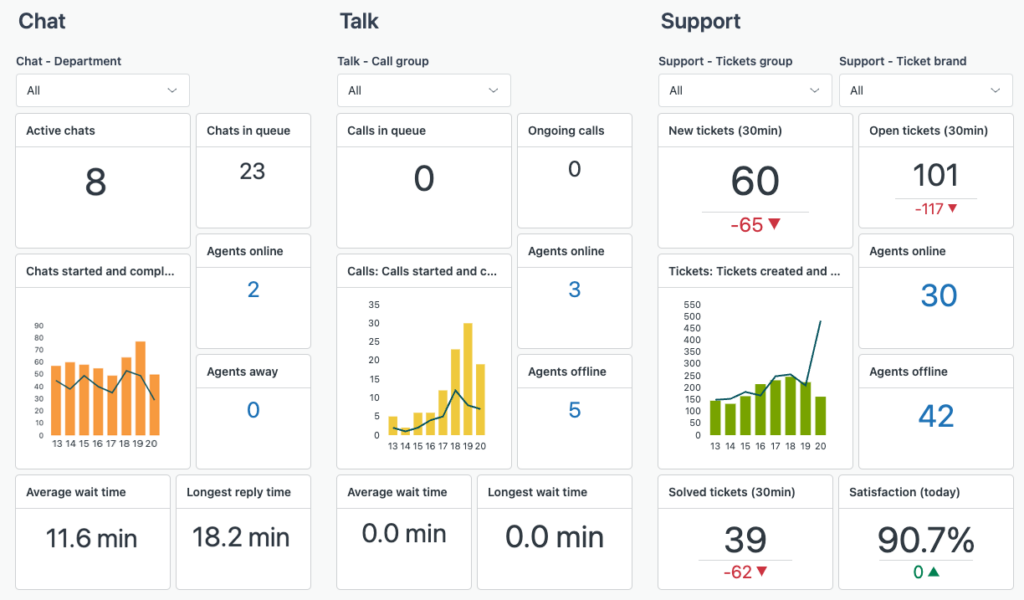
Zendesk was founded in 2007, and started off as a simple customer support software, providing a robust ticketing system for efficient issue resolution.
Over time, it expanded its capabilities beyond a helpdesk solution to a complete customer service suite, offering features like live chat, email support, and multichannel communication.
Additionally, Zendesk supports businesses with tools like AI-powered chatbots, knowledge bases, and automated workflows.
Related → Top 20 Zendesk Alternatives & Competitors (Ranked & Rated)
Intercom Overview
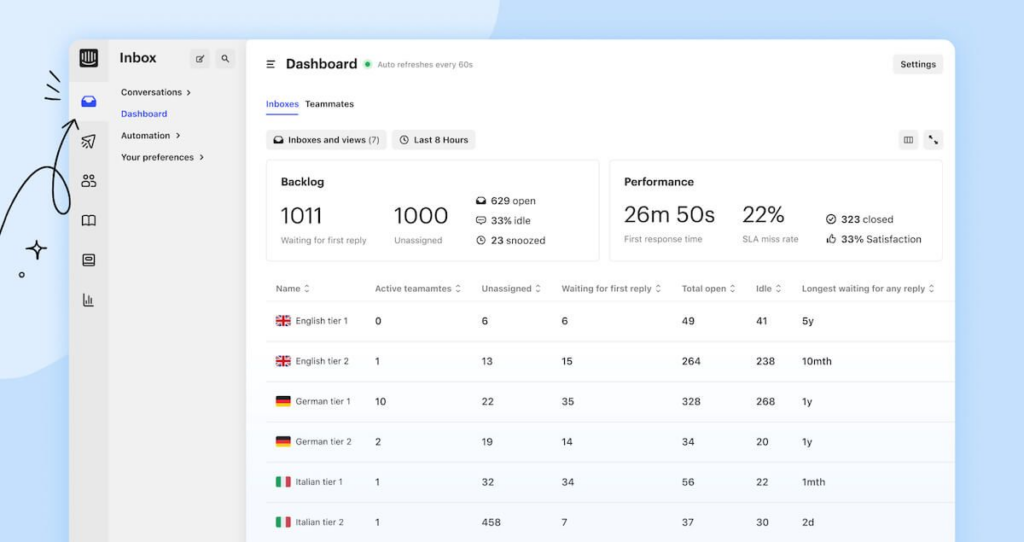
Intercom entered the scene in 2011, reshaping customer communication by focusing on conversational engagement.
The platform introduced a user-friendly platform that blends support, marketing, and customer onboarding. It included features such as in-app messaging, notifications, chatbots, live chat, and targeted email campaigns.
Plus, Intercom’s focus on personalized communication fosters customer relationships by enabling businesses to engage meaningfully at every stage of the customer journey.
Related → 20 Best Intercom Alternatives & Competitors Right Now
Key Differences Between Zendesk and Intercom
Summary:
Zendesk is tailored for businesses seeking a comprehensive customer support platform with strong ticketing, automation, and extensive integration capabilities. Its traditional interface is highly customizable, making it suitable for mid-size to large enterprises.
Intercom is ideal for companies focusing on conversational customer engagement, offering a modern interface with advanced chatbots and personalized messaging. It’s well-suited for startups and businesses aiming to enhance customer relationships through direct interaction.
Why Kustomer is a Better Option
While Zendesk and Intercom are powerful in their own right, Kustomer excels by taking on a unique approach; treating customers like people, not tickets.
Here’s what Kustomer offers:
Unified Customer View
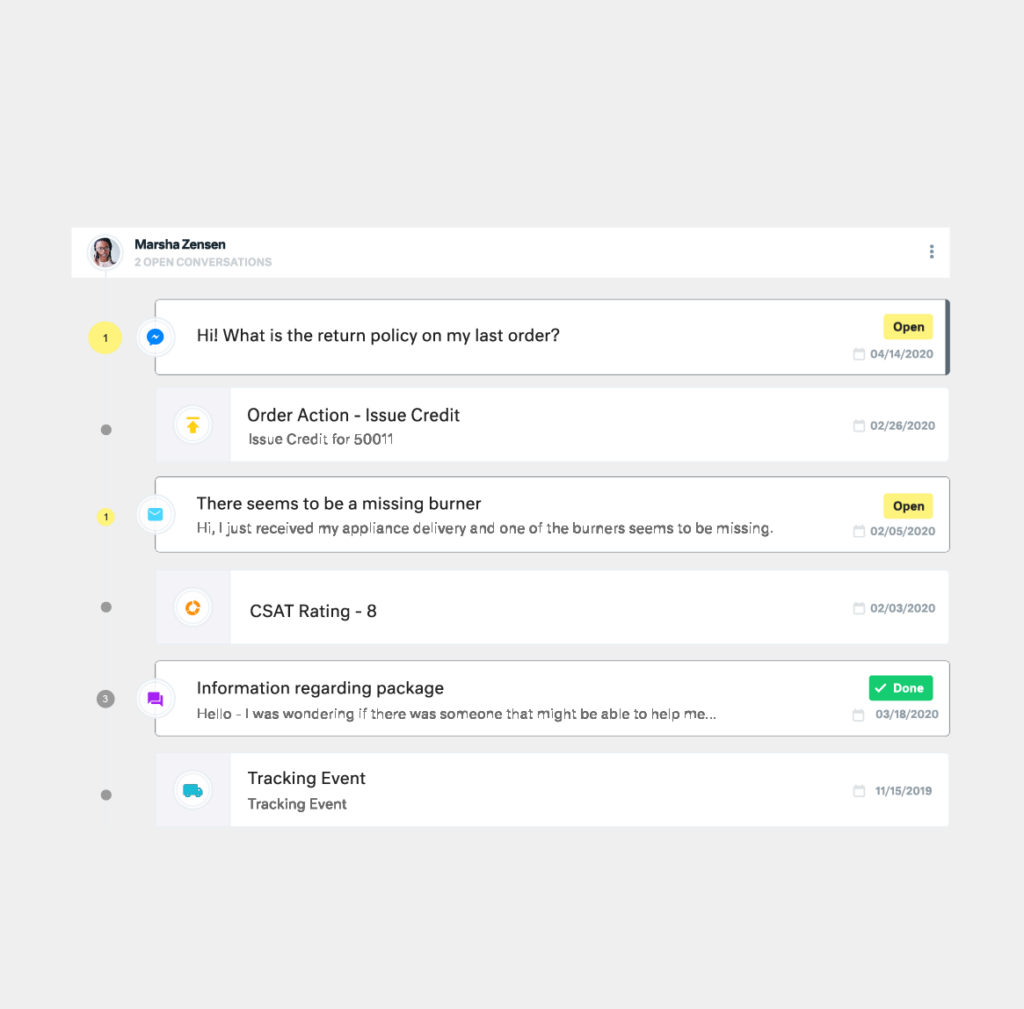
Unlike Zendesk’s ticket-based system or Intercom’s conversation-focused model, Kustomer builds everything around a comprehensive customer timeline.
This means your support team sees the complete customer journey – from past purchases and support interactions to shipping status and custom events – all in one unified workspace.
No more toggling between multiple tabs or piecing together customer history from scattered data points.
AI-Powered Automation
While both Zendesk and Intercom offer different automation features and capabilities, Kustomer takes it to the next level with its AI-powered workflows.
Instead of rigid if-then rules, Kustomer uses machine learning to understand context and intent, allowing for more intelligent routing and response suggestions.
This means fewer missed tickets and more first-contact resolutions.
Advanced Customization
One of the biggest frustrations with Zendesk is its limited customization options without diving into complex coding. Intercom, while more modern, can be rigid in its workflow options.
Kustomer strikes a balance with powerful customization tools that don’t require a developer to implement. You can easily adapt the platform to your specific business needs without getting lost in technical complexities.
Case Study → Learn how Everlane increased automation of customer requests by 4X using Kustomer AI.
Zendesk: Features, Use Cases, Pricing, Pros & Cons
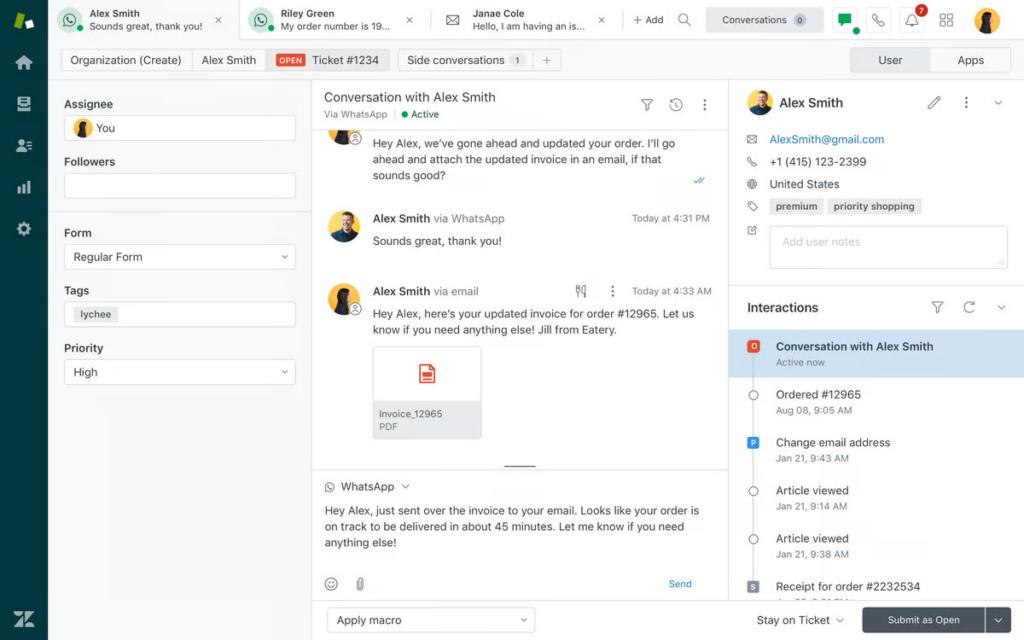
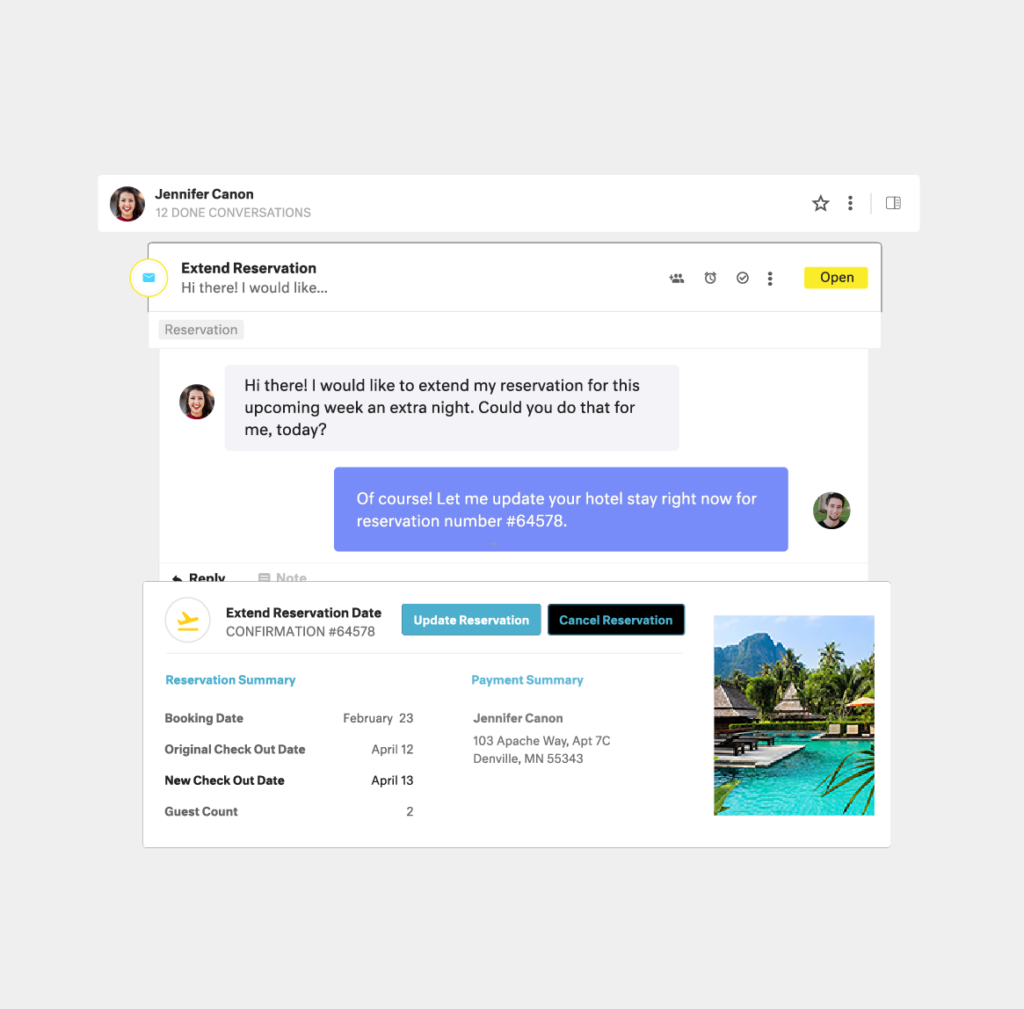
Zendesk is a customer service software that helps businesses manage customer interactions across various channels. It provides a suite of support tools, including ticket management, live chat, call center support, and knowledge base management.
The platform uses a routing engine that processes incoming requests through customizable business rules and triggers. This allows for intelligent distribution of workload across support teams, and service levels.
Zendesk also supports automation, allowing businesses to streamline repetitive tasks such as ticket assignments, follow-ups, and status updates using predefined workflows.
Key Features
Zendesk AI. AI-powered bots capable of automating up to 80% of support requests across various channels. Also features Agent CoPilot, a feature that assists support agents by offering insights, suggested replies, and the ability to execute approved actions.
Zendesk Sunshine. This is an open and flexible CRM platform built natively on AWS. It enables businesses to connect and understand all their customer data, regardless of where it resides (email, chat, social media, phone, or API integrations), allowing for a unified customer view and more personalized interactions.
Custom Objects. Allows businesses to model, store, and connect any type of data to customer profiles.
Answer Bot. This is an AI-powered tool that suggests relevant help center articles to customers, assisting them in finding answers without agent intervention. This reduces ticket volume and improves response times.
Content Cues. Uses machine learning to analyze support tickets and identify gaps in the help center content. This insight helps businesses create targeted articles that address common customer issues.
Skills-Based Routing. Ensures that tickets are assigned to agents with the appropriate expertise, improving resolution times and customer satisfaction by matching inquiries to the most qualified personnel.
Side Conversations. Allows agents to collaborate with other departments or external partners directly within a ticket through email or Slack.
Main Use Cases
Customer Service & Support. Zendesk enables businesses to efficiently handle customer inquiries across multiple channels(email, chat, phone, social media) through a unified ticketing system.
Self-Service & Knowledge Management. Organizations can build comprehensive self-service portals using Zendesk’s knowledge base feature, allowing customers to find answers to common questions independently. This reduces the volume of support tickets and empowers users to resolve issues on their own.
Enterprise Help Desk. Large organizations can deploy Zendesk as an internal help desk solution to manage employee requests across departments (HR, IT, Facilities), while maintaining separate workflows and SLAs for different request types and departmental needs.
Pricing Plans
Looks quite complicated and difficult to choose from but let’s break it down.
Zendesk offers two major pricing options: Zendesk Suite and Zendesk Support — both of which are tailored to different business needs.
Zendesk Suite Plans
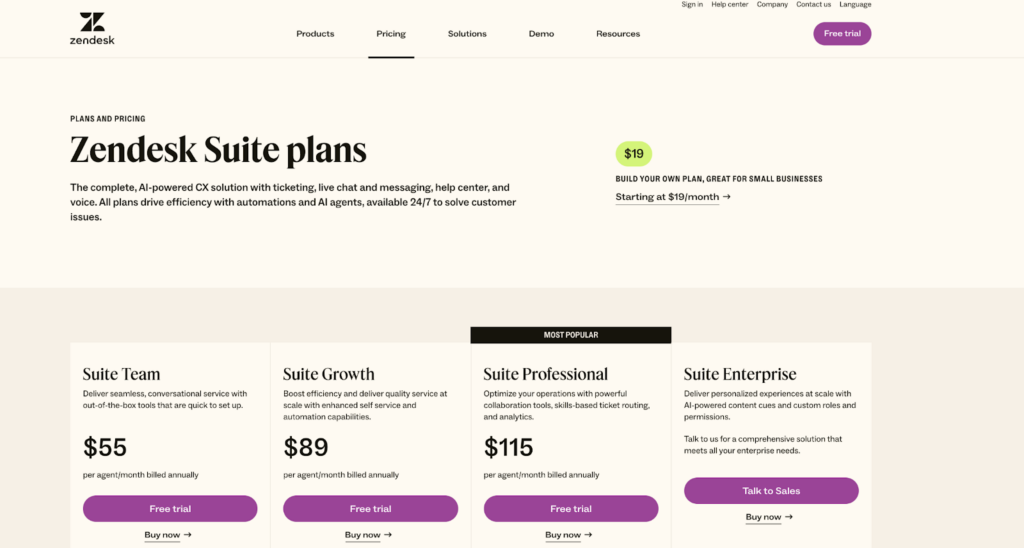
The Zendesk Suite provides an all-in-one solution that includes ticketing, messaging, help center, voice, and AI capabilities
The plans include:
Suite Team. Costs $55 per agent/month when billed annually.
Suite Growth. Costs $89 per agent/month when billed annually.
Suite Professional. Costs $115 per agent/month when billed annually.
Suite Enterprise. Costs $115 per agent/month when billed annually.
Suite Enterprise Plus. Costs $169 per agent/month when billed annually.
Zendesk Support Plans
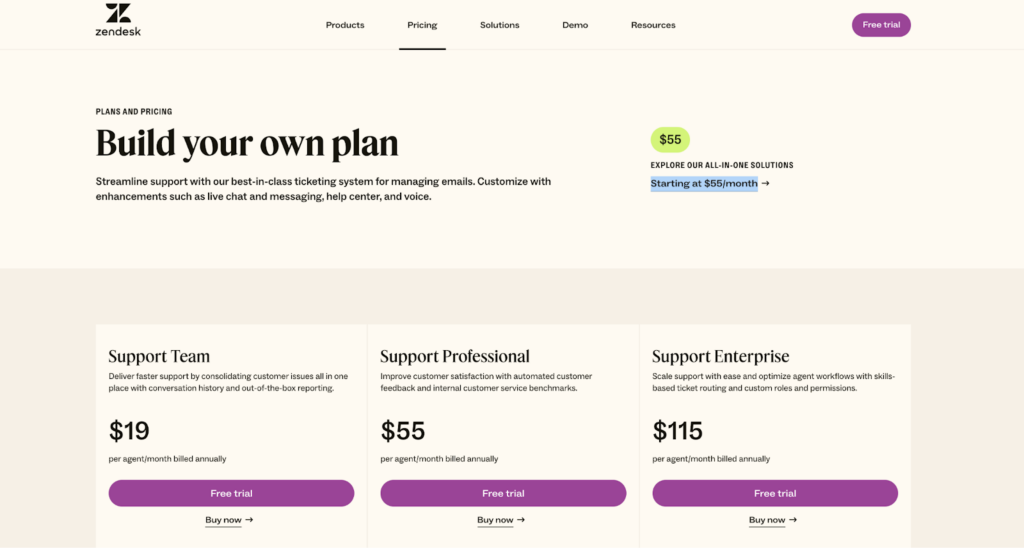
For small businesses seeking a robust ticketing system without the full suite of features, Zendesk offers Support-only plans:
Support Team. Costs $19 per agent/month when billed annually.
Support Professional. Costs $55 per agent/month when billed annually.
Support Enterprise. Costs $115 per agent/month when billed annually.
Zendesk Add-Ons
Zendesk provides several add-ons to enhance functionality:
Advanced AI. Costs $50 per agent/month when billed annually. (Available for Professional and higher plans).
Zendesk Workforce Management. Costs $25 per agent/month when billed annually. (Available for all Zendesk plans).
Zendesk Quality Assurance. Costs $35 per agent/month when billed annually. (Available for all Zendesk plans).
Zendesk Workforce Engagement Bundle. Costs $50 per agent/month when billed annually.
Advanced Data Privacy and Protection. Costs $50 per agent/month when billed annually.
Pros of Zendesk
Time-Saving Features. IT support professionals find Zendesk particularly useful for managing tickets and utilizing features like bulk updates and customizable macros, which save valuable time and improve task management [*].
Rich Functionality with Integrations. The platform offers extensive reporting capabilities through Zendesk Explore, along with useful automations and integrations with other apps like time tracking tools and JIRA [*].
Effective Centralized Communication Hub. Users love Zendesk’s ability to integrate multiple support channels into a single hub, simplifying the management of customer interactions and enhancing the efficiency of customer support operations [*].
Cons of Zendesk
Learning Curve Challenges. While powerful, Zendesk’s advanced features require significant time investment to master. Setting up complex automations and customizations often demands technical expertise, which can slow down initial implementation and team adoption. [*].
Cost Issues. The platform’s pricing structure poses challenges, particularly for growing businesses. Essential features are often restricted to higher-tier plans, making it difficult for smaller teams to access advanced functionality without significant investment. [*].
Lack of Automatic Refresh. Some users find the lack of an automatic page refresh feature to be a drawback, especially for roles that require constant monitoring of ticket flows [*].
Related → Is Zendesk Worth It? Hmm... See The Pros & Cons
Why Choose Kustomer Over Zendesk?
360o Customer Timeline. Instead of Zendesk’s somewhat clunky ticket-based system, Kustomer shows you the complete customer story. You get their entire history right in front of you – every purchase, every chat, every support interaction. It’s like having a customer’s complete story on a single page, making those ‘let me look into your previous cases’ moments a thing of the past.
Smarter AI and Routing. The AI capabilities in Kustomer just work better. While Zendesk’s automation feels a tad bit robotic and rule-heavy, Kustomer’s smart routing actually learns from your team’s patterns. It understands context and gets better at assigning tickets to the right people.
Transparent Pricing. Then there’s the cost factor. Sure, Zendesk looks cheaper at first glance, but watch out for those sneaky add-ons.
Need advanced reporting? That’ll cost extra.
Want omnichannel support? Another upgrade. Kustomer’s pricing is more straightforward – what you see is what you get, and most of the good stuff comes standard.
Modern Interface Design. The interface is another winning point. Zendesk’s platform often feels old and clunky, while Kustomer’s modern interface actually makes sense to modern support teams. You’re not spending half your training time explaining where features are hidden – everything is intuitively where you’d expect it to be.
Scalability Without Complexity. For growing teams, Kustomer scales better. Adding new channels or expanding your support operations doesn’t mean juggling multiple upgrades or dealing with complicated pricing tiers. The platform grows with you without requiring a degree in procurement to understand the costs.
Ultimately, choosing Kustomer over Zendesk comes down to this: Do you want a traditional help desk that’s been patched and updated over the years, or a modern platform built for how customer support actually works today?
Kustomer simply aligns better with how modern teams handle customer relationships – as ongoing conversations rather than isolated tickets.
Related → Learn Why People Are Ditching Zendesk for Kustomer
Intercom: Features, Use Cases, Pricing, Pros & Cons
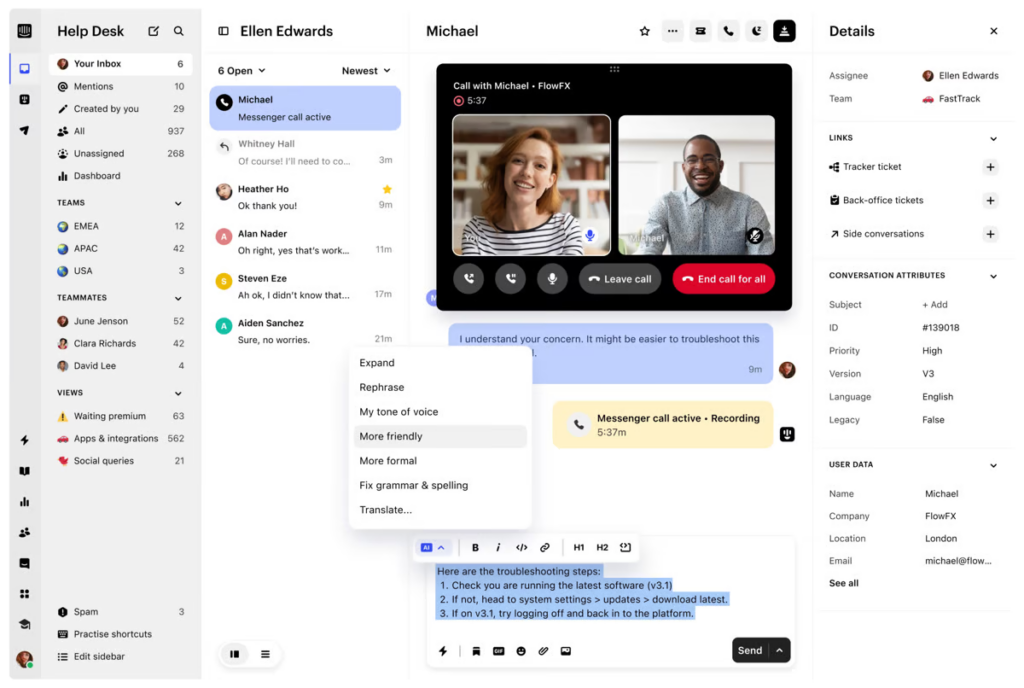
Intercom is a customer service platform that helps businesses communicate with their customers across multiple channels. It provides a unified inbox where company teams can see and respond to all customer conversations in one place, regardless of where those conversations started. This allows Intercom to build detailed profiles of customers, including their interaction history, company details, and behavioral data.
Due to the recent AI wave, Intercom’s approach has shifted towards building customer interactions on three proprietary components: Fin AI Agent, Fin AI Copilot, and AI Analyst.
The Fin AI Agent delivers instant, accurate answers to customers 24/7, ensuring timely support.
Fin AI Copilot assists support agents by providing immediate, relevant information during customer interactions, thereby improving response quality and speed.
AI Analyst offers comprehensive insights and recommendations for support leaders to make better decisions.
In addition, Intercom offers extensive customization options and a marketplace of over 450 apps including Salesforce, HubSpot, Zoho, and Slack. This enables businesses to tailor the platform to their specific needs and integrate seamlessly with existing tools.
Related → 20 Best Intercom Alternatives & Competitors for 2025
Key Features
Workflow Automation. A no-code visual builder that automates repetitive tasks for customers and agents, incorporating triggers, conditions, rules, and AI capabilities.
Outbound Messaging. Allows businesses to send automated, contextual messages to onboard, educate, and notify customers.
Product Tours. This is an add-on feature that facilitates user onboarding and product adoption through interactive, in-app guidance and tutorials.
Help Center. Enables businesses to create a branded, integrated help center with FAQ capabilities, providing customers with self-service options and reducing the load on support teams.
AI-Powered Inbox Features. Includes features like conversation summarization, response rephrasing, and content generation.
Series. Visual campaign builder that allows businesses to automate customer messaging journeys.
Operator. This is Intercom’s automation tool that manages and prioritizes conversations. It intelligently routes inquiries to the appropriate teams, sends follow-up messages, and ensures that all customer queries are answered.
Main Use Cases
Product Tours & User Onboarding. Product teams can use Intercom’s Product Tours to guide new users through features, trigger contextual help articles, and create interactive walkthroughs. This is also useful for collecting feedback and tracking feature adoption rates.
Account Management & Customer Success. Using the shared conversation history , customer success teams can monitor account health, track product usage, and reach out to customers through automated check-ins and personalized messages.
Lead Generation & Sales. Sales teams can use Intercom to capture and qualify leads through custom chatbots, schedule meetings directly through the messenger, and engage prospects with targeted content based on their behavior and characteristics.
Real-Time Customer Support. Support teams can leverage Intercom’s live chat and messenger platform to provide instant customer assistance, with features like shared team inboxes, automated responses, and chatbots handling common queries while routing complex issues to human agents.
Pricing Plans
Intercom’s public pricing page highlights only core plans like Essential, Advanced, and Expert.
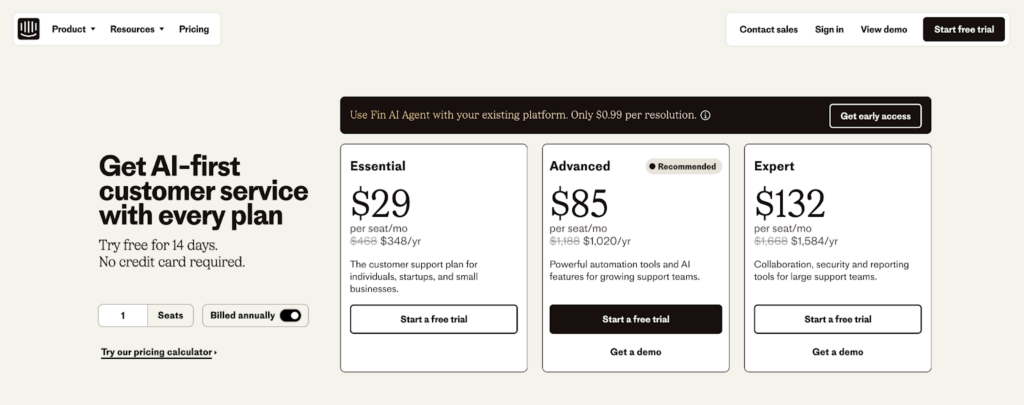
Essential. Costs $29 per seat/month.
Advanced. Costs $85 per seat/month.
Expert. Costs $132 per seat/month.
Intercom Add-Ons
Fin AI Agent. Starts at $0.99 per resolution.
Fin AI Copilot. Included with limited usage (10 tickets/conversations per agent/month); unlimited usage at $29 per agent/month.
Proactive Support+. Costs $99/month, including 500 messages sent; additional messages are usage-based.
Note → While Intercom positions a transparent pricing plan, the total cost is complex than is presented.
For example, specific feature details and eligibility criteria for certain services are often buried deep in documentation or only revealed after sales consultations.
Per-Seat Licensing. Each agent incurs a recurring monthly fee, which scales quickly as teams grow.
Add-ons. Core features like Fin AI Agent, Proactive Support Plus, and Fin AI Copilot are billed separately. This modular structure forces businesses to purchase extra features on top of base plans.
To make it worse, to get a true understanding of your potential costs, you need to use Intercom’s pricing calculator. Unfortunately, even this tool can be challenging to navigate and may not capture all potential expenses.
Let’s say a mid-sized SaaS startup with 10 support agents and 50,000 active users decides to adopt Intercom’s Advanced Plan to manage customer communication.
Here’s the estimated cost:
Advanced Plan. $85 per seat/month (billed annually)
Total Cost for 10 Agents: 10 x $85 = $850/month
Add-Ons
Proactive Support Plus: $99/month (includes 500 messages; excess billed per message)
Fin AI Copilot (Unlimited Usage): $29 per agent/month
10 agents x $29 = $290/month
Usage-Based Costs
The startup uses:
Emails: 100,000 emails/month at $0.0025 per email = $250/month
SMS Messages: 5,000 SMS at $0.05 each = $250/month
WhatsApp Conversations: 2,000 at $0.05 each = $100/month
Fin AI Agent Resolutions: 1,000 tickets at $0.99 each = $990/month
Total Monthly Cost Breakdown
Base Plan: $850
Add-Ons: $389 ($290 Fin AI Copilot + $99 Proactive Support Plus)
Usage Charges: $600 (Emails, SMS, WhatsApp)
AI Ticket Resolutions: $990
Grand Total: $2,829/month or $33,948/year.
You eventually pay double, or triple of what is presented on the website.
Pros of Intercom
Real-Time Efficiency. The messenger interface makes handling multiple conversations natural and intuitive. You can see customer context, previous interactions, and company data right alongside your chat, making responses more informed and personal [*].
Ease of Use and Onboarding. The interface is clean and logical, and you won’t need to spend weeks in training just to get started. Plus, their help resources and community support are actually helpful [*].
Customizable and User-Friendly Interface. The platform offers a highly customizable and intuitive interface, which is especially beneficial for customer support teams needing to manage multiple interaction channels [*].
Cons of Intercom
Inefficient Search Functionality. The search functionality within Intercom is sometimes inadequate, making it difficult for users to locate specific information or contacts quickly [*].
Steep Pricing Post-Startup Discount. The transition from a heavily discounted startup program to full pricing is challenging for some users, as the cost increase leads them to downgrade valuable features [*].
Complex Automation and Ticketing. Some users find the integration of conversations and tickets confusing, as it affects the application of automations and accurate performance insights [*].
Why Choose Kustomer Over Intercom?
Support-First vs. Marketing-First. While Intercom started as a marketing and engagement platform that added support features, Kustomer was built from the ground up for customer support. This means you get a platform that truly understands complex support workflows, rather than trying to adapt marketing tools for support purposes. The difference shows in how tickets are handled, how teams collaborate, and how customer information is organized.
Business Process Automation vs. Basic Workflows. Kustomer’s workflow engine can handle complex business logic that Intercom can’t touch.
Need to route high-value customers differently based on their lifetime spend?
Want to trigger specific actions based on order status and support history combined?
Kustomer handles these scenarios out of the box, while Intercom’s automation remains primarily focused on simple chat routing and basic triggers.
Support Team Efficiency. Kustomer’s interface is designed specifically for support efficiency. Instead of bouncing between conversations and help center articles like in Intercom, agents have all the tools and information they need in one view. This means faster resolution times, more consistent responses, and less agent burnout from tool-switching.
And then, there’s Intercom’s ‘shady’ approach to pricing. While their base price might look tempting, start adding essential features like custom bots, advanced routing, or proper reporting, and suddenly your bill skyrockets.
Their pricing model charges you for both seats AND conversations, meaning your costs can spiral unpredictably as you grow.
Plus, you’ll likely need their higher-tier plans to access features that come standard with Kustomer.
With Kustomer, you get a more straightforward pricing structure that includes most enterprise features out of the box, and you’re paying primarily for agent seats rather than getting hit with usage-based surprises.
Related → Kustomer vs Intercom: 2024 Mega Showdown
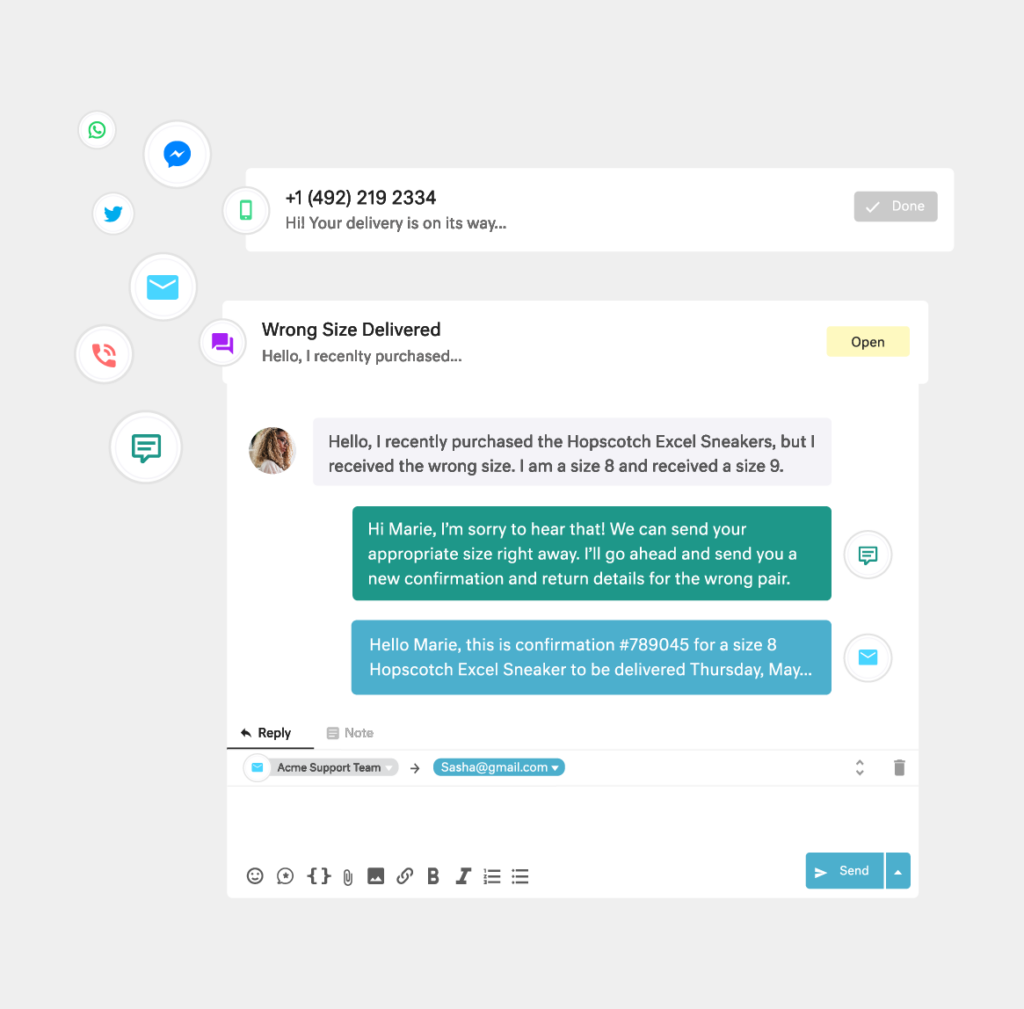
✅ Clearer, seat-based pricing
✅ No conversation volume charges
✅ Predictable monthly costs
How to Choose the Right Customer Service Platform for Your Business?
Identify Your Business Needs and Objectives
Start by defining your customer service goals and evaluating how a platform can support them. For example, if your team struggles with managing inquiries from multiple channels, prioritize a platform with robust multi-channel support.
Also, consider factors such as:
Customer Volume. How many customers do you serve daily, weekly, or monthly?
Service Channels. Which channels do you currently use (email, chat, social media, phone)?
Support Team Size. How large is your support team, and how fast is it expected to grow?
Key Service Metrics. What key performance indicators (KPIs) matter the most (e.g., response times, customer satisfaction scores)?
️Kustomer Says → Conduct internal surveys with your customer support team to understand common pain points and improvement opportunities.
Outline Core Features and Required Integrations
Make a list of essential features based on your business needs.
These may include ticket management for organizing customer queries, automation tools to reduce manual tasks, and a knowledge base for customer self-service.
Additionally, ensure the platform supports integrations with your existing tools like CRM systems, marketing platforms, or payment processors.
️Kustomer Says → Look for platforms offering customizable workflows, automated task assignment, and robust API support.
Evaluate User Experience and Interface
A platform with an intuitive interface boosts productivity and minimizes onboarding time. Check out for:
Agent Dashboard. Is the dashboard intuitive and easy to navigate?
Customer Portal. Is the customer-facing interface responsive and straightforward?
Customization. Can the interface be tailored to your brand’s look and feel?
Accessibility. Is the platform mobile-friendly for agents working remotely?
In terms of customization, you need to also opt for a platform that can adapt to your growing needs. This includes customizable workflows, adjustable service levels, and modular features that can be added or removed as needed.
For example, an eCommerce company may need advanced automation tools to manage high-volume customer inquiries during peak seasons.
️Kustomer Says → Request product demos or free trials, and involve your support team in the evaluation to gather different perspectives.
Analyze Security and Compliance Standards
Data security should be non-negotiable. Ensure the platform follows industry-standard security protocols, including data encryption, role-based access controls, and compliance with regulations like GDPR or HIPAA.
Check the vendor’s data storage policies and security certifications to ensure they meet your industry’s legal and ethical standards.
️Kustomer Says → Ask vendors to provide detailed security documentation and references from similar businesses.
Review Pricing and Total Cost of Ownership
Evaluate pricing plans carefully, considering both upfront and long-term costs.
Subscription fees, onboarding charges, and potential hidden costs like premium features or API access should be factored in.
Also compare ROI by estimating how the platform can reduce service costs and increase customer retention over time.
️Kustomer Says → Negotiate custom pricing if your business has unique support needs or requires enterprise-level service.
“For anyone considering Kustomer, I encourage you to connect with brands like UNTUCKit that use it, and also get to know some of the people at Kustomer. It’s a high-energy company with great people who are invested in your success.” —
Mike Vroom, Customer Service Director, UNTUCKit.
Which Customer Service Platform Will You Choose?
Let’s be real – choosing between Zendesk and Intercom feels a bit like picking between two slightly different versions of the same thing.
One’s great at tickets, the other’s good at chat, but both still leave you piecing together a complete customer service solution.
But what if you didn’t have to compromise?
Kustomer gives you everything you need in one platform.
No more switching between tabs to piece together customer histories.
No more clunky workflows that slow down your team.
Just seamless, intelligent customer service that makes both your agents and customers happier.
The best part? Instead of adapting your workflow to fit your software’s limitations, Kustomer adapts to how your team actually works.
It’s customer service software that finally puts both your team and your customers first.
Tired of Zendesk and Intercom? We figured…